앱 · 고친 날 2026-11-25
표 꺼내기 — 웹 쪽의 표를 엑셀·CSV로
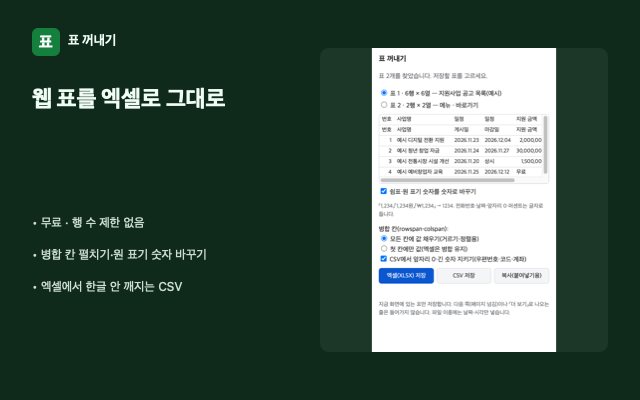
지금 보는 웹 쪽의 표를 골라 엑셀(XLSX)이나 CSV 파일로 저장합니다. 무료이고 행 수 제한·유료 잠금이 없습니다.
하는 일
- 한 쪽에 표가 여러 개면 목록에서 고릅니다(행·열 수와 첫 줄 미리보기).
- 병합 칸(rowspan·colspan)을 펼쳐 모든 칸에 값을 채우거나 첫 칸에만 둡니다(엑셀 파일은 병합 유지).
- 「1,234」「1,234원」「₩1,234」를 계산할 수 있는 숫자로 바꿉니다(켜고 끌 수 있음). 전화번호·날짜·앞자리 0인 코드·퍼센트는 글자 그대로 둡니다.
- CSV는 UTF-8 BOM으로 저장해 엑셀에서 한글이 깨지지 않고, 우편번호·코드의 앞자리 0과 긴 숫자를 지킵니다.
- 엑셀·구글 시트에 바로 붙여 넣을 수 있게 복사합니다.
- 「=」「+」로 시작하는 칸은 수식으로 실행되지 않게 저장합니다.
개인정보
- 모든 일이 브라우저 안에서 일어납니다. 확장은 바깥으로 아무 요청도 보내지 않고(보안 정책으로 막음), 표 내용·쪽 주소·설정 어느 것도 저장하지 않습니다.
- 파일 이름은 「table-날짜-시각」 — 쪽 제목이나 주소를 넣지 않습니다.
권한
activeTab— 아이콘을 누른 그 탭에만, 누른 때에만 접근합니다.scripting— 그 탭에서 표를 읽는 작은 코드를 한 번 실행합니다(쪽을 바꾸지 않음).
설치
- 크롬 웹 스토어 — 준비 중 (스토어 심사 뒤 링크)
Table to Excel & CSV
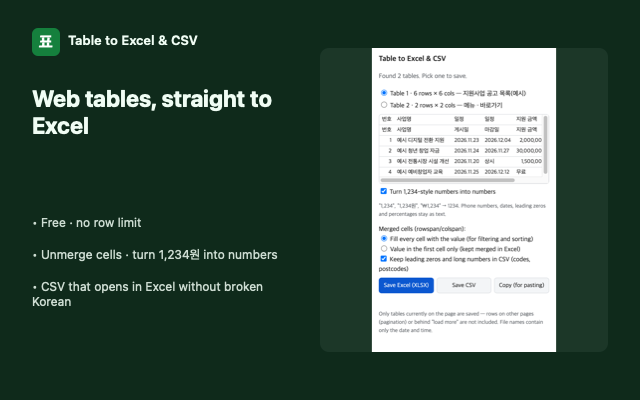
Saves a table from the page you're on as an Excel (XLSX) or CSV file. It's free, with no row limit and no paid tier.
What it does
- Several tables on a page? Pick one from a list (row/column count and a preview of the first row).
- Merged cells are unmerged: fill every cell, or keep the value in the first cell only (merged again in the Excel file).
- Turns “1,234”, “1,234원”, “₩1,234” into real numbers (optional); phone numbers, dates, codes with leading zeros and percentages stay as text.
- CSV is saved as UTF-8 with BOM so Excel shows Korean correctly, and leading zeros and long numbers are kept.
- Copy a table to paste straight into Excel or Google Sheets.
- Cells starting with “=” or “+” are saved so they never run as formulas.
Privacy
- Everything happens in your browser. The extension sends no requests (blocked by its security policy) and stores no table content, page address or settings.
- File names are “table-date-time” — never the page title or address.
Permissions
activeTab— Access only to the tab where you click the icon, only when you click it.scripting— Runs a small script once in that tab to read the tables (the page is not changed).
Install
- Chrome Web Store — Coming soon (link after store review)